Integrate filesystem

HULFT Integrate provides its own implementation of a filesystem abstraction layer. The purpose of this abstraction layer is to allow for Integrate Services to access different types of concrete filesystems in a uniform and platform independent way without having to know what type of filesystem they're accessing.

Concept of Integrate filesystem

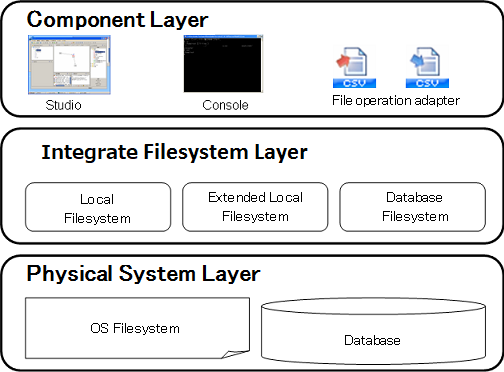
Integrate filesystem architecture

Integrate filesystem architecture is represented in the diagram below.

Component Layer

Component layer consists of components which interact with Integrate filesystem's abstraction layer.
These components include Integrate Studio, CLI Console, and adapter components which fall into File adapter category.
All of these components perform indirect access to the filesystem through Integrate filesystem's abstraction layer via its specified interface between the component layer and the platform filesystem or a database.

Integrate filesystem Layer

Integrate filesystem Layer provides a common file model that is capable of representing conceivable filesystem's general features and behavior.
There are three types of Integrate filesystem, each controls data flow between the component layer and the physical layer by its own specific way.

Physical Layer

This is the layer that contains the actual data.
It could be the platform dependent filesystem or a database, or both, depending on how Integrate filesystem is configured.

Types of Integrate filesystem

There are 3 different types of Integrate filesystem.

filesystem Types Description Notation used in [Type] attributes in Explorer
Local filesystem Data is stored in the OS's filesystem.It performs the fastest, but it cannot save the file meta-information such as owner and permissions of a file, or whether a file is write-protected by the file lock feature or not.
If there is no repository database used, Local filesystem it the only option available for the filesystem type.
LOCAL
Extended local filesystem The file meta-information is stored in the repository database and data itself is stored in the OS's filesystem.It does not perform as fast as the Local filesystem.
Can be used for the system with a repository database.
LOCAL|EXTENDED
Database filesystem Both the file meta-information and the file data are stored in the repository database table.
the maximum file size supported varies depending on the DBMS used.
Can be used for the system with a repository database.
none

Integrate type of filesystem is synonymous with the type of mount.

OS local filesystem

OS local filesystem is a term we use to distinguish the actual filesystem of the OS from the aforementioned abstraction filesystem layer provided by Integrate filesystem.

There are two terms we use for this OS local filesystem, accordingly to which part of the HULFT Integrate is running, whether it is IntegrateServer or Integrate Studio.

Mount

Mount is a mechanism used to associate the Integrate filesystem with a particular point in the OS local filesystem's hierarchy or a database table. The associated filesystem directory in the OS local filesystem's hierarchy is called mount point

The association of a mount point and Integrate filesystem can be done in Mount Settings in the Control Panel.

System Mount

There are number of directories in the OS's filesystem's hierarchy associated with the Integrate filesystem by default when the system starts up:
System mount point is as follows.

When there is use of a repository database

When no repository database is used

The directories for system mount can be changed in system.properties.
They cannot be changed if database filesystem is used.

Restrictions on characters used in Integrate filesystem

Use of the following characters and strings are disallowed in Integrate filesystem. Use of characters and symbols that are not common in both Windows and UNIX/Linux platform are restricted.
Additionally, the tilde sign, ~ is disallowed as it represents a shot cut that points to a user's home directory in some platform.

Case sensitivity

The following table presents how in Integrate filesystem case sensitivity plays a part.

Item Filesystem Type case sensitive or case insensitive applicable fields
Files and directories found under /etc, /home, /share
(when a repository database is used)
Database filesystem Complies with the database you use and settings of that
  • Project name
  • Service name
  • Global Resource name
  • Global Schema name
  • Trigger name
  • Holiday settings calendar name
  • In the file path string to the log output destination.
  • In the name of a user or a group(when a repository database is used)
Files and directories found under /etc, /home, /share
(no repository database is used)
Local filesystem Depends on OS platform in which IntegrateServer is running
  • Windows version: Case insensitive
  • UNIX/Linux version: Case sensitive
Name of files and directories to be stored, except for /etc,/home,/share Local filesystem and Extended local filesystem Depends on OS platform in which IntegrateServer is running
  • Windows version: Case insensitive
  • UNIX/Linux version: Case sensitive
-
Names stored in configuration files. - Case sensitive
  • Script names
  • Folder names
  • Script variable names
  • Environment variable names
  • Names of icons
  • Names for log search criteria
Names of files and directories stored under associated mount points Database filesystem Case Sensitive -
Local filesystem and Extended local filesystem Depends on OS platform in which IntegrateServer is running
  • Windows version: Case insensitive
  • UNIX/Linux version: Case sensitive
-

It is encouraged to be mindful of case sensitivity issues when developing application in order to avoid case-related problems when performing server migrations to different OS platforms in the future.
Specifications may change depending on the version.

Specification Limitations